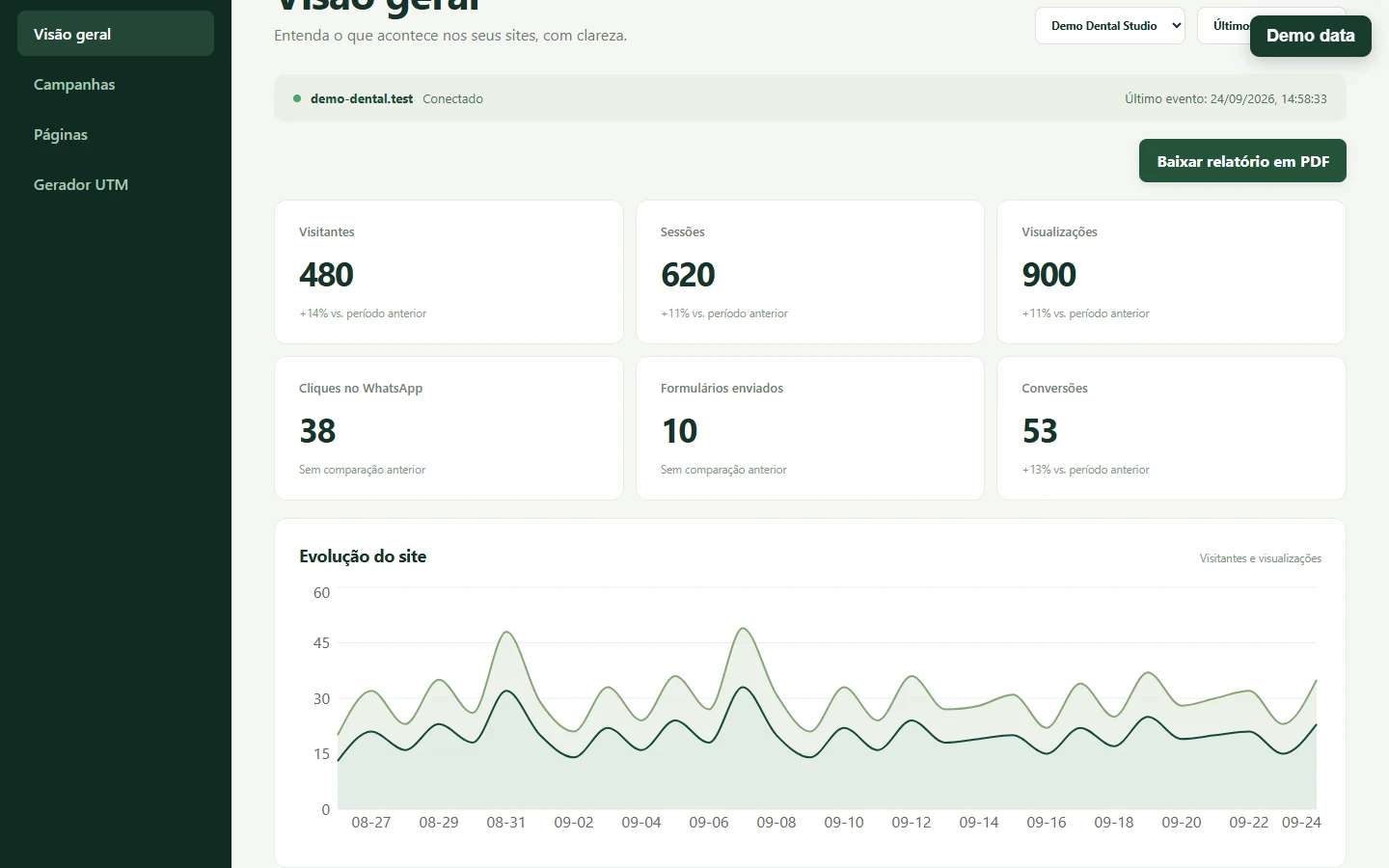
“Visitors,” “sessions” and “pageviews” look like three simple dashboard numbers. They answer different questions, and none is an exact count of human beings. In Pierre Analytics, each is derived from stored events for a selected site and time range. Knowing the counting rules makes the dashboard useful without giving the figures more certainty than they have.
This is the measurement chapter of Building Pierre Analytics. The architecture overview explains how the events reach the dashboard; the database chapter explains how they are stored securely.
Start with an event, then choose the count
The browser tracker sends a session_start event when it creates a fresh session and a page_view event when it first runs. It also observes supported history changes and sends another pageview for a changed route. Each event carries a random visitor ID and session ID. The server validates and saves accepted events, including the site and event timestamp. A duplicate event ID for the same site is not counted twice.
The dashboard query then uses three different SQL ideas over the selected time range:
| Dashboard label | Counting rule in the project | Plain meaning |
|---|---|---|
| Visitors | Distinct visitor_id values across events |
Browser IDs seen for this site and period |
| Sessions | Distinct session_id values across events |
Session IDs seen for this site and period |
| Pageviews | Count of events whose type is page_view |
Recorded page-load or supported route-view events |
This is why a pageview is not a session, and a session is not a person. One session can have many pageviews. One visitor ID can have more than one session. Multiple browser contexts can also generate different visitor IDs for the same person.
A small, hypothetical example
Imagine a demo data sequence on a single site. A browser opens the home page, then an article page. The tracker records one session ID, one visitor ID and two pageviews. The dashboard would show 1 visitor, 1 session, 2 pageviews for those accepted events in the selected range.
After more than 30 minutes without an event in that browser tab, another activity creates a new session ID. If the visitor ID remains in that tab’s sessionStorage, the combined range would now show 1 visitor, 2 sessions, 3 pageviews. Opening a separate tab can create separate storage and another visitor ID. The figures are an illustration of the code’s rules, not a real site’s results.
The session timer is based on activity observed by the tracker. It is not a live-presence signal. Seeing an event at 10:00 does not establish that someone was still reading at 10:20. No heartbeat or real-time online-user measure is implemented in the examined tracker.
How the time range affects interpretation
The API filters events by site and an inclusive start with an exclusive end. Its totals count IDs present among events inside that range. A session that started before the selected period but produced a pageview within it can appear in that period’s session total even if its session_start event lies outside. A visitor returning on different days may appear once in a multi-day distinct count but once in each day’s individual series. Daily visitor figures should therefore not be added to reproduce a whole-period distinct-visitor total.
The backend limits custom ranges to 90 days. The daily chart groups timestamps using the site’s configured timezone. The project’s README notes that the custom date control uses UTC day boundaries, while “Today” uses the site timezone. That difference matters near midnight and should be considered when comparing a custom period with a site-local daily chart.
What worked
The calculation is inspectable: the backend uses distinct IDs for visitors and sessions and filters page_view events for views. The project’s local tests cover event persistence, duplicate handling and dashboard reads using fictitious sites. Site filtering is applied before aggregation, keeping one customer’s accepted events out of another customer’s dashboard query.
What was difficult
The labels are familiar, but the identifier lifetime is unusual enough to deserve a note beside the charts. The tracker stores random IDs in sessionStorage, with an in-memory fallback if storage is unavailable. This storage choice avoids a durable cross-browser identifier, but it also makes “visitor” especially dependent on tabs, browser behavior and blocked scripts. The session boundary is an inactivity rule rather than a natural human visit boundary. An automatic form_submit listener records the attempt, not necessarily server-side success; a WhatsApp click records a click, not a sent message.
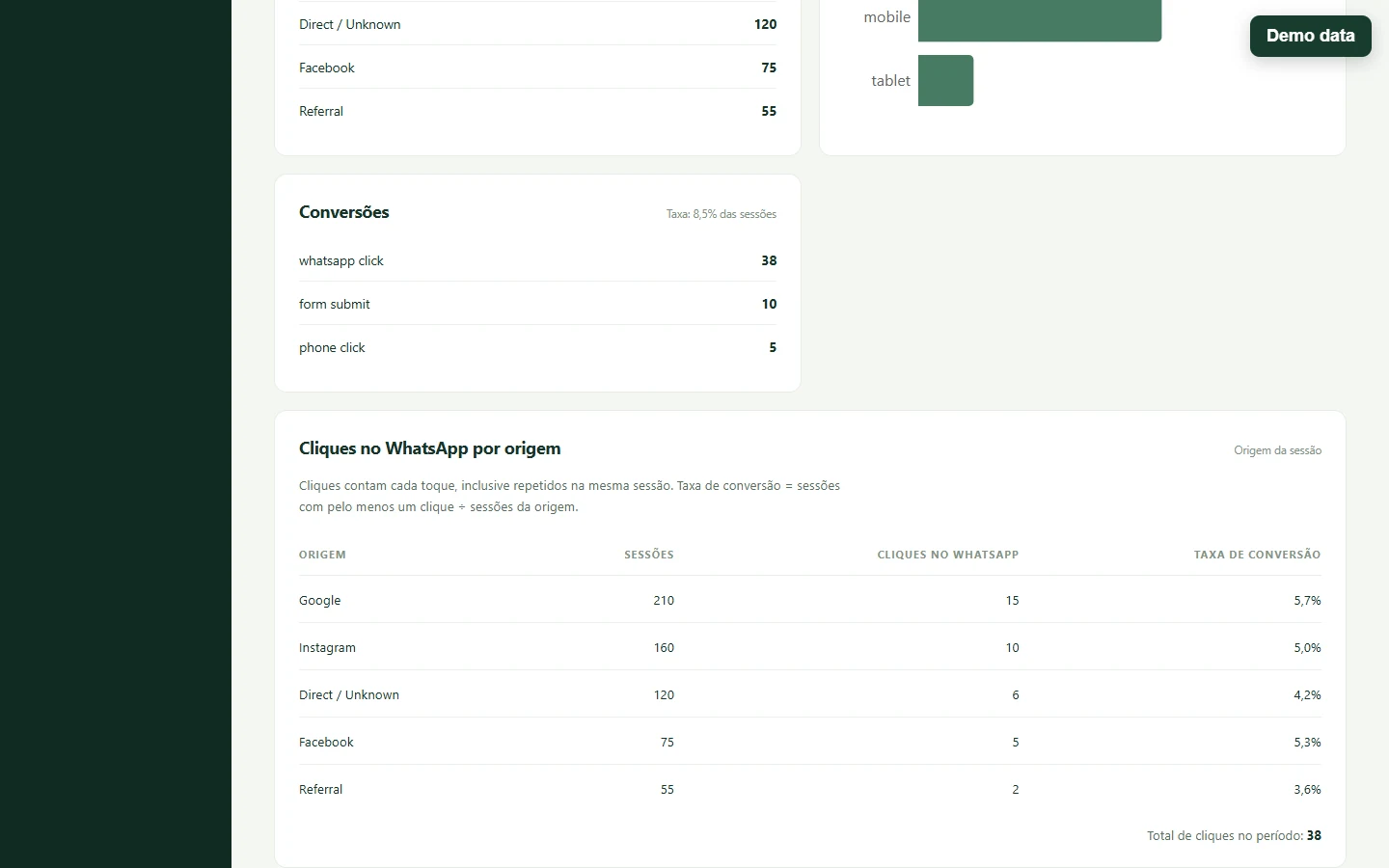
The demonstration makes the click distinction visible: 38 WhatsApp clicks occurred in 31 sessions with at least one click, across 620 sessions. The per-source rate divides converted sessions by that source’s sessions. For example, the Google row uses 12 converted sessions out of 210, or 5.7%. These are deliberately fictitious numbers.
Current limitations and next steps
Counts can be low when scripts are blocked, delivery fails, or the tracker is absent. They can be high when one person uses multiple tabs or devices. Invalid or forged events can also affect counts despite request checks. The current distinct-ID queries read raw events rather than a scalable approximate-cardinality rollup. There is no evidence here for treating the figures as audited traffic, unique people or online presence.
When reviewing a dashboard, write down the site, time range, timezone and definition of each metric first. Then compare trends under the same rules. Continue with the full system overview for how the dashboard presents these counts.